

Digital literacy is no longer just about knowing how to use a smartphone, computer or the internet. It is about understanding digital technology, using it effectively, checking the information we receive and behaving responsibly in the online world. From schoolchildren and teenagers to working professionals and senior citizens, everyone needs digital literacy to participate safely and confidently in today’s connected society.
We live in a time when almost everything is becoming digital. Children attend online classes, teenagers spend time on social media, adults use digital banking and online services, and senior citizens depend on smartphones to communicate with family members. Although technology makes life easier, it also creates risks such as cyberbullying, misinformation, identity theft, online scams and financial fraud.
Simply spending several hours on the internet does not make someone digitally literate. We must understand how to use digital tools, develop the ability to solve problems independently, verify online information and recognise the difference between responsible and harmful digital behaviour.
There are four important pillars of digital literacy: Digital Literacy, Digital Capability, Digital Verification and Digital Ethics. Understanding these four areas can help individuals of every age become smarter, safer and more responsible digital citizens.
What Is Digital Literacy?
Digital literacy is the ability to access, understand, evaluate, create and communicate information using digital technologies safely and effectively.
It includes more than basic computer knowledge. A digitally literate person knows how to find reliable information, use useful applications, protect personal data, recognise online threats and make informed decisions.
For example, a person who knows how to send a WhatsApp message has basic digital skills. However, someone who can identify a suspicious message, verify its source, protect personal information and avoid forwarding misinformation demonstrates a deeper level of digital literacy.
Digital literacy is important because technology influences education, employment, communication, healthcare, financial transactions and everyday decision-making.
Digital literacy is also recognised as an important foundation for lifelong learning and participation in today’s digital society. Read more in the UNESCO digital literacy resources
The Four Essential Components of Responsible Digital Participation
1. Digital Literacy: Understanding Digital Tools
The first pillar is understanding the digital environment and learning to use the tools available to us.
Many people use smartphones, computers and social media platforms every day without knowing how to make the best use of them. Digital literacy education helps individuals identify useful tools and understand how these tools can improve their personal, educational and professional lives.
Different people need different digital tools depending on their age, education, occupation and daily activities.
Digital tools for different age groups
Children and school students
Children should learn to use age-appropriate educational platforms, digital libraries, online dictionaries and learning applications. These tools can make education more interactive and help children develop independent learning habits.
For example, a student preparing a science project can use educational websites, online encyclopaedias and digital videos to understand a subject better.
Teenagers
Teenagers need digital knowledge that supports education, creativity and responsible social interaction.
Useful tools include:
- Google Search for educational research.
- Google Docs for preparing assignments.
- Google Slides or PowerPoint for presentations.
- Canva for designing educational materials.
- Educational websites and online learning platforms.
- Digital calendars and productivity applications.
They should also understand social media privacy settings, account security and the risks associated with unknown online contacts.
Working adults
Adults can use digital tools to improve productivity, communication and financial management.
Examples include:
- Email and video conferencing applications.
- Word processors and spreadsheets.
- Digital banking and payment applications.
- Online government services.
- Cloud storage and document-sharing platforms.
- AI tools for research, writing and productivity.
Senior citizens
Older adults should receive practical training in using smartphones and essential digital services.
They can learn to:
- Make video calls with family members.
- Send messages and photographs.
- Book train and bus tickets.
- Access healthcare information and appointment services.
- Use digital payment applications safely.
- Access government services online.
The objective is to help senior citizens become more independent without depending on others for every digital activity.
Practical example
An older person wants to book a train ticket to visit a family member. Instead of depending entirely on someone else, they can learn to use an official railway booking service, enter passenger details and check the booking confirmation.
However, they should also understand how to identify fake booking websites and fraudulent payment requests.
2. Digital Capability: Using Technology to Create and Solve Problems
Knowing how to operate digital tools is only the beginning. The second pillar, digital capability, focuses on using those tools effectively to complete tasks, solve problems and develop useful solutions.
A digitally capable person does not depend on others for every small digital task. They understand how to combine available tools and customise them according to their requirements.
Digital capability also encourages creativity, independent thinking and problem-solving.
Examples of digital capability
For children
Children can learn to create digital drawings, prepare presentations, develop simple educational projects and explore basic coding through age-appropriate platforms.
For teenagers
Teenagers can develop practical skills such as:
- Creating presentations and digital portfolios.
- Editing photographs and videos.
- Designing posters and infographics.
- Building simple websites.
- Learning basic programming.
- Using AI tools for learning and creative projects.
For adults
Working professionals can use technology to organise their work, prepare reports, manage budgets, create presentations and automate repetitive tasks.
For example, a small business owner can use a spreadsheet to track daily sales, expenses and monthly profits instead of maintaining everything manually.
For senior citizens
Senior citizens can learn to manage digital documents, make online appointments, communicate through video calls and use essential online services independently.
Practical example: Using digital tools to solve everyday problems
Suppose a student needs to prepare a presentation about environmental protection.
A student with basic digital literacy may know how to open a presentation application. However, a digitally capable student can research reliable information, organise the findings, create slides, add suitable images and prepare a complete presentation independently.
Similarly, an adult can create a household budget using a spreadsheet, while a small business owner can use digital tools to manage customers and inventory.
The important lesson: Digital capability transforms people from passive technology users into active creators and problem-solvers.
3. Digital Verification: Checking Information Before Believing It
The third pillar is digital verification. It means checking the accuracy, reliability and authenticity of information before believing it, acting on it or sharing it with others.
The internet provides enormous amounts of information through Google, YouTube, WhatsApp, Facebook, Instagram and other platforms. Unfortunately, not everything we see online is true.
Fake news, misleading advertisements, manipulated photographs, AI-generated videos and fraudulent messages can influence people’s decisions.
Without proper verification skills, anyone can become a victim of misinformation or online fraud.
Why is digital verification important?
Health information
Suppose someone experiences a headache and searches Google for its possible causes. The search results may show several medical conditions, including serious illnesses.
Accepting the first result without understanding the context can create unnecessary fear. A person should consult reliable medical sources and seek professional medical advice when needed.
Fake news and misinformation
A teenager receives a WhatsApp message claiming that schools will remain closed for several weeks because of an emergency.
Instead of forwarding the message immediately, the teenager should check the official school website, education department announcements or reliable news sources.
Fake investment opportunities
An older person receives a social media advertisement promising unusually high returns within a few weeks.
Before investing money, the person should investigate the company, check relevant regulatory information and consult a qualified financial professional if necessary.
AI-generated content and deepfakes
Artificial intelligence can generate realistic photographs, voices and videos. A video showing a familiar person saying something controversial may not always be genuine.
People should check the original source, look for independent confirmation and avoid sharing unverified content.
How to verify digital information
- Check who published the information.
- Look for the original source.
- Compare the information with reliable independent sources.
- Check the publication date and context.
- Be cautious about sensational headlines.
- Verify photographs and videos before sharing.
- Never make financial or medical decisions based only on social media posts.
Remember: Pause, investigate and verify before believing or forwarding information.
4. Digital Ethics: Knowing What to Do and What Not to Do Online
The fourth pillar is digital ethics. It refers to the principles and values that guide responsible behaviour when using digital technology.
People should understand that online actions have real-world consequences. Something that appears to be a harmless joke on a smartphone can cause emotional distress, damage someone’s reputation or result in legal consequences.
Children and teenagers especially need guidance to understand the difference between acceptable online behaviour and harmful activities.
Important aspects of digital ethics
Cyberbullying
Sending threatening messages, humiliating someone in online groups, spreading rumours and posting abusive comments are examples of cyberbullying.
Children and teenagers should understand that online harassment is not entertainment or a harmless joke.
Photo morphing and deepfakes
Manipulating someone’s photograph or creating fake images and videos without consent can seriously affect their privacy, dignity and reputation.
Never create or share manipulated images to embarrass, threaten or harm another person.
Respecting privacy
Do not share someone else’s personal photographs, phone numbers, private messages or personal information without permission.
Responsible social media use
Think carefully before posting photographs, comments or videos. Online content can be copied, saved and shared even after the original post is deleted.
Copyright and intellectual property
Do not copy another person’s photographs, articles, videos or creative work and claim them as your own. Respect copyright and provide appropriate attribution when required.
Responsible use of artificial intelligence
AI tools can help people learn, write and create content. However, they should not be used to impersonate people, spread false information, create harmful manipulated images or deceive others.
Practical example
A teenager edits a classmate’s photograph and shares it in a school WhatsApp group to make friends laugh.
The teenager may consider it a joke, but the person in the photograph may experience humiliation, anxiety and emotional distress.
Digital ethics teaches us that something considered funny by one person can seriously hurt another.
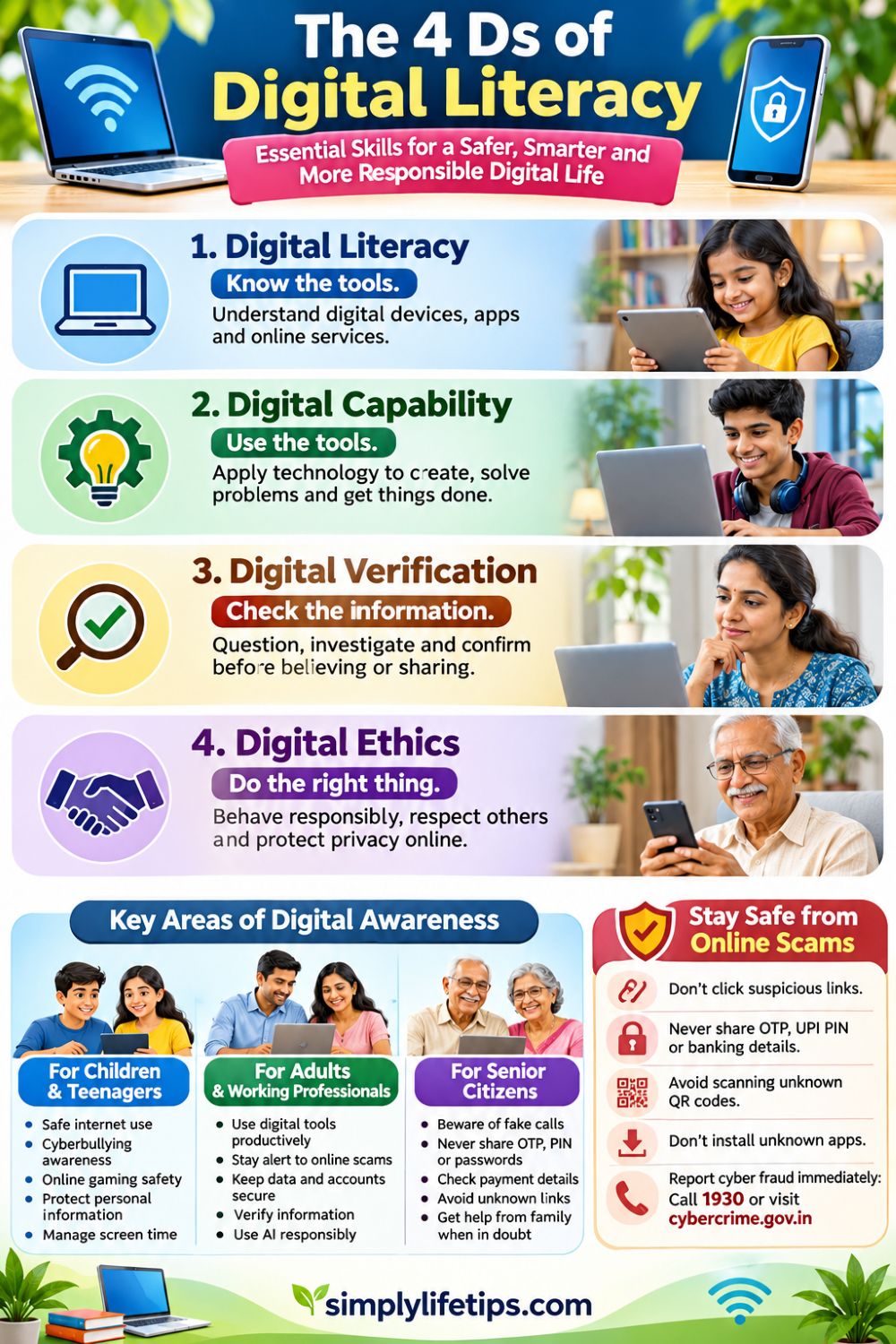
Digital Safety: Protecting Yourself from Online Scams and Cyber Fraud
Digital safety is an essential part of responsible digital literacy. As more people use online banking, UPI payments, social media and digital services, cybercriminals are finding new ways to deceive users.
Many people lose money because they trust unknown callers, click suspicious links, share confidential information or respond to attractive online offers without checking their authenticity.
Children, teenagers, adults and senior citizens all need awareness of online threats.
The Reserve Bank of India also provides guidance on protecting users against digital banking risks. Readers can explore its digital banking safety guidelines
Common Types of Online Scams
1. Phishing messages and fake links
Scammers send SMS messages, emails or WhatsApp messages pretending to represent banks, delivery companies or government organisations.
For example, someone receives a message stating that their bank account will be blocked unless they update their KYC details through a link.
The link may lead to a fake website designed to collect banking information and passwords.
What to do: Never open suspicious links or enter banking credentials through links received from unknown sources. Contact the organisation through its official website or verified customer service channel.
2. UPI and QR code fraud
Digital payment applications make transactions convenient, but scammers misuse them to deceive people.
For example, someone selling a used mobile phone receives a message from a supposed buyer who sends a QR code and asks the seller to scan it to receive payment.
The seller should understand that receiving money does not require entering a UPI PIN. A UPI PIN is used to authorise a payment.
What to do: Never enter a UPI PIN to receive money. Verify the payment in your banking application rather than trusting screenshots or payment messages sent by strangers.
3. Fake customer care calls
Fraudsters pretend to be bank employees, customer care representatives or technical support staff.
They may claim that a bank account has a problem and ask for an OTP, PIN or password.
What to do: Never disclose OTPs, passwords, CVV numbers or UPI PINs to anyone. Banks do not need these confidential details to verify customers over the phone.
4. Fake job and work-from-home offers
Scammers advertise attractive jobs with high salaries and little work. They may demand registration fees, training charges or deposits before offering employment.
For example, a job seeker receives an offer promising thousands of rupees every day for completing simple online tasks. After making an initial payment, the person is asked to deposit more money to unlock higher earnings.
What to do: Research the employer, verify the job advertisement and avoid paying advance fees to unknown recruiters.
5. Online investment scams
Fraudsters promote fake investment platforms, cryptocurrency schemes and stock market groups promising guaranteed profits.
They may initially show fake profits to encourage victims to invest larger amounts.
What to do: Verify investment platforms and financial intermediaries through official regulatory sources. Be suspicious of guaranteed returns, pressure to invest quickly and requests to transfer money to personal accounts.
6. Impersonation and digital arrest scams
Scammers may pretend to be government officials, law enforcement representatives or other authorities. They may threaten people with arrest or legal action unless money is transferred immediately.
What to do: Do not panic or transfer money because of threatening calls. Verify claims independently through official channels. A video call or official-looking document does not automatically establish someone’s identity.
7. Lottery and prize scams
A person receives a message claiming they have won a lottery, smartphone or large cash prize. To receive the reward, they must pay processing fees, taxes or registration charges.
What to do: Do not pay money to claim unexpected prizes. Verify the offer through the official organisation.
Essential Cyber Safety Rules Everyone Should Follow
- Never share OTPs, UPI PINs, ATM PINs or banking passwords.
- Use strong, unique passwords for important accounts.
- Enable two-factor authentication wherever available.
- Avoid clicking unknown links or downloading suspicious attachments.
- Never install unknown applications or APK files sent by strangers.
- Do not allow unknown people to access your phone through remote-access applications.
- Keep smartphones, computers and applications updated.
- Avoid conducting banking transactions over unsecured public Wi-Fi.
- Check the recipient’s details before making digital payments.
- Report suspicious calls, messages and transactions immediately.
What Should You Do If You Lose Money Through Cyber Fraud?
If you become a victim of financial cyber fraud in India, act quickly.
- Contact your bank or payment service provider immediately and report the unauthorised transaction.
- Call the national cybercrime helpline 1930 as soon as possible.
- Report the incident through the National Cyber Crime Reporting Portal.
- Preserve transaction IDs, bank messages, screenshots, phone numbers and other available evidence.
- Follow the bank’s and authorities’ instructions and retain the complaint acknowledgement.
Prompt reporting may help the authorities and financial institutions take action to trace or prevent further movement of the money. However, recovery is not guaranteed.
Be particularly careful of people who contact you promising to recover lost money in exchange for an advance payment. These may be recovery scams targeting previous victims.
Digital Literacy for Children and Teenagers
Children and teenagers are growing up in a world where smartphones, social media, online games and digital entertainment are part of everyday life.
They need guidance to understand both the opportunities and dangers of the internet. Restricting technology alone is not enough. They must learn how to use it wisely.
Important Digital Awareness Lessons for Children
Safe internet habits
Children should learn not to share their full names, home addresses, school details, passwords or personal photographs with strangers.
Parents should actively teach children how to recognise online threats, protect personal information and interact safely with others. Read our detailed guide on online safety for children for more practical guidance.
Cyberbullying awareness
Teach children to recognise threatening messages, online humiliation and abusive behaviour. Encourage them to tell a trusted adult when they experience or witness cyberbullying.
Online friendships
Not everyone online is who they claim to be. Children should avoid sharing personal information with unknown people and should never agree to meet online contacts without appropriate adult guidance.
Gaming safety
Some online games include chat facilities, purchases and interactions with strangers. Children should understand the risks of suspicious game downloads, fake rewards and requests for money.
Social media responsibility
Teenagers should think before posting photographs, comments and videos. They should understand that deleted posts may already have been copied or shared.
AI and deepfake awareness
Teenagers should learn that photographs, voices and videos can be manipulated using AI. They should not believe or forward every realistic-looking video.
Screen-time management
Digital education should also encourage a healthy balance between online activities, studies, physical exercise, sleep and face-to-face relationships.
Parents and educators should also understand how to protect children from online risks, respect their privacy and encourage safe internet habits. UNICEF provides useful guidance on children’s online privacy and safety
Excessive screen time can affect concentration, sleep and daily activities. Parents and teenagers can explore these practical digital detox tips to reduce screen time and develop healthier technology habits.
A Practical Example for Teenagers
A teenager receives a direct message from an unknown social media account. The person initially behaves like a friendly classmate but gradually requests personal photographs and private conversations.
The teenager should recognise the warning signs, avoid sharing private content, block and report the account when appropriate, preserve evidence of threatening behaviour and speak to a trusted adult.
Parents should create an environment where children feel comfortable reporting uncomfortable online experiences without fear of being blamed or punished.
Excessive digital distractions can make it difficult for children to concentrate on their studies and other activities. Read our guide on child concentration problems and practical solutions to understand the issue better.
Digital Awareness for Senior Citizens
Senior citizens are increasingly using smartphones for communication, banking, shopping, healthcare and government services.
However, some older adults may have difficulty recognising sophisticated online scams, especially when fraudsters use fear, urgency or impersonation to gain their trust.
Digital literacy programmes should therefore include practical training for senior citizens.
Essential Digital Safety Lessons for Older Adults
Recognising fake bank calls
Never trust someone simply because they claim to be a bank employee. Contact the bank through its official phone number or visit the branch if necessary.
Understanding UPI payments
Learn how to check payment requests, verify recipient details and distinguish between sending and receiving money.
Avoiding fake customer care numbers
Do not select customer care numbers from random search advertisements or unverified websites. Use official bank or service provider contact information.
Identifying fake investment schemes
Avoid schemes promising guaranteed returns, unusually high profits or immediate financial rewards.
Protecting WhatsApp accounts
Never share WhatsApp verification codes. Be cautious of messages asking you to click unknown links or forward suspicious information.
Avoiding remote-access fraud
Never install screen-sharing or remote-control applications because an unknown caller asks you to do so.
A Practical Example for Senior Citizens
An elderly person receives a call from someone claiming to be a government official. The caller says that a legal case has been registered against them and demands an immediate payment to avoid arrest.
The person becomes frightened and considers transferring money.
Digital awareness teaches them to remain calm, avoid transferring money and verify the claim through official channels.
Family members should regularly discuss common scams with older adults and help them practise safe digital transactions.
The Role of Parents and Families in Digital Literacy
Digital literacy should not be the responsibility of schools or individual users alone. Families play an important role in developing safe and responsible digital habits.
Parenting in a technology-driven world requires a balance between digital freedom, guidance and appropriate boundaries. Explore our guide to parenting in the digital age for practical strategies to help children develop healthy technology habits.
Parents should guide children without creating an atmosphere of fear or unnecessary control.
Families can:
- Discuss online safety and common scams regularly.
- Establish age-appropriate rules for device and internet use.
- Help children understand privacy settings.
- Encourage teenagers to report cyberbullying and suspicious contacts.
- Teach senior citizens how to identify fraudulent calls and messages.
- Verify suspicious financial requests before transferring money.
- Learn about new online scams together.
- Set a positive example through responsible digital behaviour.
Most importantly, family members should avoid blaming someone who becomes a victim of cyber fraud. Instead, they should help the person report the incident and take appropriate action.
Practical Ways to Improve Digital Literacy
Digital literacy is a lifelong learning process. Technology changes continuously, and people must update their knowledge to remain safe and productive.
Here are some practical ways to improve digital skills.
1. Learn to Use Essential Digital Tools
Start with basic applications such as search engines, email, word processors, spreadsheets, video conferencing and online learning platforms.
2. Develop Critical Thinking
Do not believe everything you see on social media. Learn to check sources, compare information and recognise misleading content.
3. Improve Cybersecurity Awareness
Understand passwords, two-factor authentication, privacy settings, software updates and safe digital payment practices.
4. Learn About Artificial Intelligence
Explore how AI tools work, what they can do and where they may produce inaccurate or misleading information.
5. Practise Digital Skills Regularly
Use digital tools to solve everyday problems, create useful content, organise information and improve productivity.
6. Participate in Digital Awareness Programmes
Schools, colleges, workplaces, community organisations and family groups can organise practical sessions on digital literacy, cyber safety and online fraud prevention.
7. Teach Others What You Learn
Helping children, parents, neighbours and senior citizens understand digital technology can improve digital awareness throughout the community.
Using technology responsibly also means maintaining a healthy balance between online and offline activities. Discover practical strategies in our digital wellness guide to develop a healthier relationship with technology.
Conclusion
Digital literacy is no longer an optional skill reserved for technology professionals or young people. It is an essential life skill for everyone who uses the internet.
The four pillars—Digital Literacy, Digital Capability, Digital Verification and Digital Ethics—provide a practical foundation for navigating the digital world. They help people understand technology, use it creatively, identify unreliable information and behave responsibly online.
Children and teenagers need guidance to develop healthy digital habits. Adults need digital skills to improve productivity and protect their financial information. Senior citizens need confidence and awareness to use online services without falling victim to fraud.
Above all, everyone must understand that digital convenience comes with digital responsibility. Knowing how to use a smartphone is not enough. We must also know how to recognise scams, protect personal information, question suspicious messages and respect others online.
A safer digital society begins when individuals become informed, capable, critical and responsible technology users.
Are we teaching the next generation—and ourselves—not just how to use technology, but how to use it wisely and safely?
Frequently Asked Questions About Digital Literacy
1. What are the four pillars of digital literacy?
The four pillars discussed in this article are Digital Literacy, Digital Capability, Digital Verification and Digital Ethics. Together, they help people understand digital tools, use technology effectively, verify information and behave responsibly online.
2. Why is digital literacy important for children and teenagers?
Digital literacy helps children and teenagers use educational tools, recognise misinformation, protect personal information, avoid cyberbullying and understand the risks of online interactions.
3. How can senior citizens protect themselves from cyber fraud?
Senior citizens should never share OTPs, PINs or banking passwords, avoid unknown links, verify suspicious calls, use official banking channels and report financial cyber fraud immediately.
4. What is the difference between digital literacy and digital capability?
Digital literacy involves understanding digital technologies and knowing how to use them. Digital capability means applying that knowledge to create content, solve problems and complete tasks independently.
5. What should someone do after becoming a victim of online financial fraud in India?
They should contact their bank immediately, call the national cybercrime helpline 1930, report the incident through cybercrime.gov.in and preserve transaction details and other evidence. Quick reporting is important, although recovery of the money is not guaranteed.
References and Further Reading
- UNESCO digital literacy resources
- UNICEF’s guidance on children’s online privacy
- RBI’s digital banking safety guidelines
- National Cyber Crime Reporting Portal
Disclaimer: This article is intended for general educational and awareness purposes. It does not replace professional medical, financial, legal or cybersecurity advice. Always verify important information through official sources.

Mathukutty P. V. is the founder of Simply Life Tips. He shares practical advice and useful insights on personal growth, health, well-being, technology, and everyday living. His goal is to help readers build positive habits and make informed decisions. He believes in continuous learning and sharing knowledge to help people live healthier, happier, and more meaningful lives.